How to Build a DevSecOps Pipeline With Autonomous Security Enforcement

DevSecOps pipeline architecture with autonomous security enforcement

A security scan that runs after your build is not a DevSecOps pipeline. It is a security checkbox that runs after your build. The distinction matters because one approach catches vulnerabilities before they reach production, and the other hopes someone reads the report.

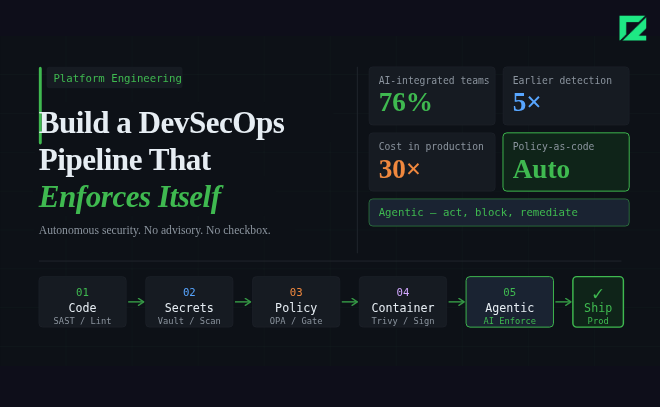
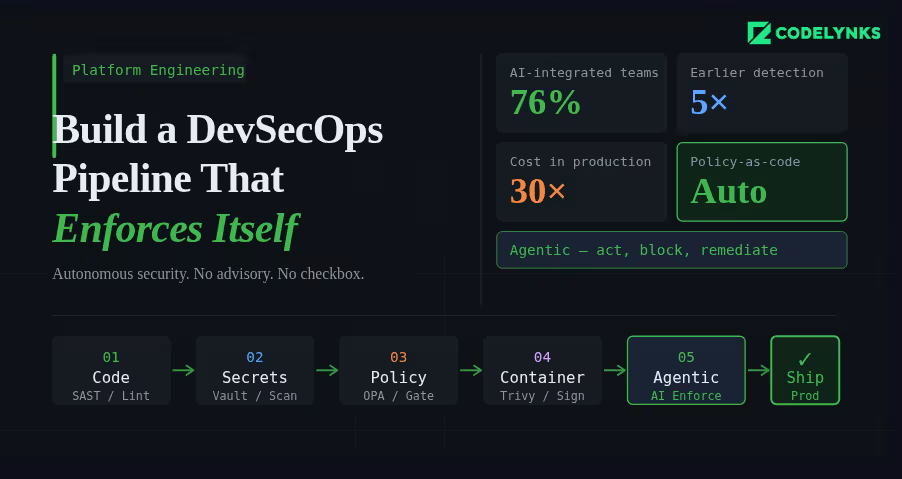
According to industry data from N-iX and DZone’s 2026 DevOps surveys, 76% of DevOps teams have already integrated AI into their CI/CD pipelines. The shift happening now is not just more tooling in the pipeline. It is tooling that can act, enforce, and remediate, not just report. This guide explains how to build a pipeline where security is a hard constraint, not an advisory. A modern DevSecOps pipeline integrates automated security checks into every CI/CD stage.

The Architecture of a Secure Pipeline

A DevSecOps pipeline has security controls at four stages: before the commit, during the build, before deployment, and in production. Each stage catches different classes of vulnerability. Skipping any stage creates a gap that will eventually be exploited.

Stage 1: Pre-Commit Hooks

Pre-commit hooks are the first line of defense. They run on the developer’s machine before code reaches the repository.

What to run at pre-commit:

  • Secrets scanning: Detect API keys, credentials, and tokens before they are committed. Tools: detect-secrets (Yelp), gitleaks, or truffleHog. Configure with a deny-list that matches your organisation’s credential patterns.
  • Linting and formatting: Enforce code style standards. Not strictly security, but a consistent codebase is easier to audit.
  • Infrastructure-as-code validation: If developers write Terraform or Kubernetes manifests, run a lightweight policy check (tflint, kubeval) to catch obvious misconfigurations before the commit reaches the pipeline.

Use the pre-commit framework (pre-commit.com) to manage hooks declaratively in a .pre-commit-config.yaml file, committed to the repository. This ensures every developer runs the same set of checks.

Stage 2: Build-Time Checks (Pull Request Gate)

Every pull request should trigger a suite of automated security checks that must pass before the branch can be merged. These are the pipeline gates.

  • Static Application Security Testing (SAST): Analyse source code for known vulnerability patterns without running the code. Tools: Semgrep (best open-source option), Checkmarx (enterprise), SonarQube with security rules. Configure severity thresholds: CRITICAL and HIGH findings block the merge, MEDIUM and LOW generate tickets.
  • Software Composition Analysis (SCA): Check every open-source dependency against known CVE databases. Tools: Snyk, OWASP Dependency-Check, GitHub Dependabot. Flag dependencies with CVE scores above your threshold. The biggest advantage of a DevSecOps pipeline is continuous security enforcement during development and deployment.
  • Infrastructure policy validation: Run Checkov or Terrascan against all Terraform and CloudFormation changes in the PR. Policy violations block the merge.
  • SBOM generation: Generate a Software Bill of Materials for the build artifact. Tools: Syft, CycloneDX. Store it as a build artifact. This is becoming a procurement requirement for enterprise and government customers.

Stage 3: Pre-Deployment Checks

Before any artifact reaches staging or production, validate the complete deployable unit, not just the source code.

  • Container image scanning: Scan the built container image, not just the application code. Base images carry their own vulnerabilities. Tools: Trivy (open source, fast), AWS ECR scanning, Google Artifact Analysis. Block deployment of images with HIGH or CRITICAL CVEs in base image packages.
  • Image signing and verification: Sign built images with cosign (Sigstore) and enforce signature verification at deployment time using a Kubernetes admission controller. This prevents tampering between build and deployment.
  • Kubernetes manifest validation: Validate deployment manifests against your security policies using Kyverno or OPA/Gatekeeper as an admission controller. Block pods running as root, containers without resource limits, and images from unauthorised registries.

Stage 4: Runtime Security Monitoring

Deployment is not the end of the security pipeline. Production has a different threat surface than the build environment.

  • Runtime threat detection: Tools like Falco (open source) or Sysdig detect anomalous behaviour in running containers: unexpected outbound connections, process executions that are not in the image, file system writes to unexpected locations. Alert on these immediately.
  • Periodic image rescanning: A CVE-free image today may be vulnerable tomorrow. Schedule weekly rescans of all images in your container registry. Automatically open tickets for newly discovered vulnerabilities in deployed images.
  • API anomaly detection: Unusual API call patterns, authentication failures above baseline, and privilege escalation attempts in production need automated detection and response. Define your baseline, set alerting thresholds, and create automated response playbooks for the highest-severity patterns.

Where Agentic AI Fits In

The 2026 evolution in DevSecOps is not just more tools. It is tools that can reason about context, suggest remediations, and act autonomously on low-risk findings.AI-powered monitoring is becoming a core capability in every enterprise DevSecOps pipeline.

AI-powered SAST tools can understand the data flow context of a vulnerability, not just its pattern signature. A SQL injection vulnerability in a function that only receives internally-validated input has a different risk profile than one receiving raw user input. Contextual analysis produces fewer false positives and more accurate severity ratings.

AI remediation suggestion at the pull request stage has demonstrated significantly higher fix rates than traditional vulnerability reporting. When a developer sees a suggested code change alongside the vulnerability finding, they fix it immediately. When they receive a ticket in Jira, it joins the queue.

Getting Started: The Minimum Viable DevSecOps Pipeline

If you are starting from zero, do not try to implement all four stages simultaneously. Build in this order:

  1. Add secrets scanning as a pre-commit hook and as a pipeline check. This is the highest-severity gap in most pipelines and takes less than a day to implement.
  2. Add SCA for dependency vulnerability scanning on every PR. Use Snyk or Dependabot. Configure automated PRs for patch-level updates.
  3. Add SAST with Semgrep. Start with the community rulesets, tune the false positive rate for your codebase over the first month.
  4. Add container image scanning with Trivy. Block deployment on CRITICAL CVEs, alert on HIGH.
  5. Add infrastructure policy checks with Checkov. Define your top-10 must-enforce policies first.
  6. Add runtime monitoring with Falco. Define alert rules for your most sensitive workloads first.

Steps 1-4 can be implemented within two weeks. Steps 5-6 require more planning but are achievable within a quarter.

Need Help With This?

Codelynks builds DevSecOps pipelines for engineering teams in regulated industries. If you need a security posture assessment or want to design a CI/CD pipeline with autonomous security enforcement, talk to our team at contact us
Powerful Strategies for Zero Trust Security to Boost Productivity and Protect Data in 2026

Zero Trust Security protecting business data

Introduction

Across every industry, digital transformation is accelerating business cycles — and with it, the attack surface that cybercriminals exploit. Today’s organizations face sophisticated threats that can compromise sensitive data, disrupt operations, and erode customer trust overnight. Traditional perimeter-based security models, built on the assumption that everything inside the network is safe, are simply no longer adequate against modern adversaries.

Zero Trust Security rejects that assumption entirely. Rooted in the principle of “never trust, always verify,” it treats every user, device, and application as a potential threat — regardless of whether they are inside or outside the network perimeter. The result is a security framework that is both more resilient and more adaptive than its predecessors.

In this article, we explore how adopting a Zero Trust model strengthens your security posture, reduces financial and reputational risk, ensures business continuity, and — perhaps surprisingly — actively improves team productivity through AI-powered tools.

Zero Trust Builds a Stronger Security Posture

Unlike traditional security architectures that assume implicit trust for anyone inside the network, Zero Trust verifies every access request continuously — regardless of origin. Every user, device, and application is treated as a potential threat until proven otherwise. This identity-centric approach drastically reduces risk by enforcing least-privilege access at every layer.

In practice, Zero Trust achieves this through a combination of strict Multi-Factor Authentication (MFA), real-time behavioral monitoring, and micro-segmentation of the network. These controls ensure that organizations have a clear, continuous view of who is accessing what — and can act instantly when something looks wrong. Even if an attacker obtains a set of valid credentials, the granular access controls in a Zero Trust environment prevent them from moving laterally across systems, dramatically limiting the blast radius of any breach.

Reducing Financial and Reputational Risk: The financial consequences of a cyberattack can be severe. According to IBM’s 2024 Cost of a Data Breach Report, the average cost of a data breach reached $4.88 million — a figure that encompasses data recovery, legal fees, regulatory fines, and lost business. Reputational damage compounds these costs, with long-term impacts on customer trust and brand equity that are difficult to quantify but impossible to ignore.

Zero Trust addresses both dimensions. By proactively narrowing the attack surface and containing threats before they spread, organizations that adopt Zero Trust consistently report fewer high-severity incidents and faster recovery times. For security-conscious leaders, this translates directly into lower insurance premiums, reduced legal exposure, and stronger stakeholder confidence.

Zero Trust Security: Proactive Cybersecurity for Business Continuity

A reactive approach to cybersecurity is no longer sufficient. The volume and sophistication of threats — from ransomware to supply chain attacks — demand a proactive, always-on defense strategy. Zero Trust is designed precisely for this environment.

Continuous Verification for Better Data Protection: Zero Trust enforces continuous verification of every access request, whether the user is on-premises or remote. This is especially critical in regulated industries such as healthcare, finance, and retail, where a data breach can trigger HIPAA, PCI-DSS, or GDPR violations in addition to significant business losses. For example, if an employee attempts to access sensitive financial records outside of their normal role or hours, a Zero Trust system flags the anomaly and requires re-verification — preventing both accidental and malicious data exposure.

Containing Threats to Ensure Business Continuity: One of the most dangerous business continuity risks is the spread of a security incident across interconnected systems. Ransomware attacks, for instance, have forced major organizations to shut down operations for days or even weeks. Zero Trust’s micro-segmentation capability directly addresses this: by isolating network segments, it prevents a compromised node from infecting the broader environment. A real-world example is Google’s BeyondCorp initiative, one of the earliest and most cited Zero Trust implementations, which allowed Google employees to work securely from any network without a traditional VPN — maintaining continuity without sacrificing control. For most organizations, micro-segmentation means that even during an active incident, core operations can continue while the security team contains and remediates the threat.

Impact of Zero Trust Security on Team Productivity with AI Tools

Security is a top priority, but it should not come at the cost of team productivity. This is where Zero Trust excels: it delivers robust protection without creating friction in everyday workflows.

Seamless Security through AI-Powered Access Decisions: Traditional security mechanisms — such as manual approval workflows and blanket VPN access — slow teams down. Zero Trust replaces this friction with intelligent, automated access decisions driven by AI. Tools like Microsoft Entra ID (formerly Azure AD), Zscaler Zero Trust Exchange, and CrowdStrike Falcon continuously analyze user behavior patterns, device health, and location context to make real-time access decisions. When an anomaly is detected — such as a login from an unfamiliar geographic location or an unrecognized device — the system does not simply lock the user out. Instead, it prompts for an additional authentication factor (such as MFA) and grants adaptive access. This keeps legitimate users productive while still enforcing strict security controls.

AI-Powered Automation: Faster Incident Response: Zero Trust environments also leverage AI-driven automation to dramatically accelerate incident response. Rather than requiring security teams to manually triage every alert — a process that is both slow and error-prone — AI tools can automatically initiate containment actions in real time. For example, if a device is flagged as compromised, the system can isolate it from the network instantly, without waiting for human intervention. This reduces mean time to respond (MTTR), minimizes downtime, and frees IT teams to focus on strategic priorities rather than reactive firefighting.

How to Start Implementing Zero Trust in Your Organization

Adopting Zero Trust is not an overnight project — it is a phased journey. Here are the foundational steps organizations can take to get started:

1. Identify and classify your sensitive data and assets. You cannot protect what you cannot see. Begin by mapping your most critical data, applications, and systems. Understanding what needs the most protection is the starting point for any Zero Trust strategy.

2. Enforce strong identity verification. Deploy MFA across all users and systems. Adopt an Identity and Access Management (IAM) platform — such as Okta, Microsoft Entra ID, or Ping Identity — to centralize and enforce identity policies.

3. Apply least-privilege access. Ensure users and systems can only access what they strictly need. Regularly audit and revoke excess permissions. Role-based access control (RBAC) is a core building block here.

4. Segment your network. Implement micro-segmentation to isolate workloads and limit lateral movement. Solutions like Illumio, VMware NSX, or Zscaler can help enforce this at scale.

5. Monitor continuously and automate response. Deploy behavioral analytics and SIEM/SOAR tools (e.g., Splunk, Microsoft Sentinel) to maintain real-time visibility and automate threat response. Zero Trust is not a set-and-forget model — continuous monitoring is essential.

For reference, the NIST Special Publication 800-207 provides a comprehensive framework for Zero Trust Architecture that organizations of all sizes can use as a blueprint.

Conclusion: The Case for Zero Trust Security

As cybersecurity threats continue to grow in volume and sophistication, organizations can no longer afford to rely on perimeter-based defenses built for a different era. Zero Trust Security offers a modern, proactive framework that strengthens data protection, reduces financial and reputational risk, and ensures business continuity — all without sacrificing team productivity.

With AI-powered tools and phased implementation strategies, Zero Trust is more accessible than ever for organizations of any size. Whether you are just beginning your Zero Trust journey or looking to mature an existing program, the investment pays dividends in both security resilience and operational efficiency.

Ready to build a Zero Trust strategy tailored to your organization? Contact our security team to explore how we can help you get started.

More Blogs: The Ultimate 7 Transformative Advantages of Multi-Cloud Strategies Empowering Modern Enterprises

  • Copyright © 2026 codelynks.com. All rights reserved.

  • Terms of Use | Privacy Policy